

"Buy Me A Coffee"

  • 3 Posts
  • 67 Comments
Joined 3 years ago
cake
Cake day: June 13th, 2023

help-circle

  • Are you able to query to see what IP address that domain returns? Does it return the 192.168.x address that you set?

    Edit: But the idea is to first see where the connection is failing… first see what error your browser is returning? 5xx? 4xx? This can be an indication as to where the error is happening. But high-level check DNS first, see if nslookup or dig return the IP address that you set. (Remember changes to DNS entries can take time to propagate). Assuming all of that is correct, then check to see what nginx is showing in its logs. Do you see it logging anything every time you try and access it via the domain name? Next up is checking the logs from plex itself, does it show any logs coming though? etc… But the idea is to find where the connection is breaking down.




  • More technically there’s two ways to move data between two separate services. You can either pull or push the data.

    Assume for both scenarios that the client is your phone and the server is some machine in the cloud.

    With pulls the client calls an API and the server returns a response. Generally the www works this way. You ask a server for a wab page and you effectively pull the source down to your browser.

    Pushes work the opposite, in that a server has data for the client and needs to push or otherwise give it to you. Pulls are relatively strait forward because every server has a well known name (the domain name and url). But your phone’s IP address changes constantly. So how does a server know how to contact your device? There’s generally two ways:

    1. Your device can poll (make repeated pulls to a server checking for new data)
    2. Or you can register some identifier and your IP address with some central server every time it changes. And then the server can essentially call a URL on your device directly. This is essentially what Google and Apple are doing as it doesn’t waste CPU resources and your battery.

    You could in theory implement either of these yourself but because of the way the OSes work on both Android and iOS there’s no guarantee that you can keep a process running in the background forever. As the OS can kill your process if the OS needs more free ram, etc … The built in notification APIs are exempt from this because they are part of the OS.


  • If it was a certificate issue I’d expect youd just get an error from your browser saying the cert is invalid or expired.

    If I had to guess though you’re running into a nat reflection issue: https://nordvpn.com/cybersecurity/glossary/nat-loopback/

    Read up on that. But you may need to provide different DNS entries if you’re inside or outside your LAN or add a NAT hairpin rule to your router. But this is only applicable if you’re exposing the same service to the WWW.

    Some other things to try though:

    • Have you tried just pinging the address? Is the DNS resolution returning the address you expect?
    • Whats in your nginx logs? Do you see anything when you try and connect?
    • Within your nginx container can you ping your service directly? Is something blocking nginx from accessing the site?


  • marsara9@lemmy.worldtoSelfhosted@lemmy.worldService monitoring
    link
    fedilink
    English
    arrow-up
    1
    ·
    11 months ago

    Can you share the Home Assistant automation / setup that you have for Uptime Kuma notifications? As I’m in the same boat as you. I just got a webhook setup but I’m getting flooded with notifications, especially after services update.

    My hope is I just want to be notified when a particular service is down for say 5 minutes but all I care about is knowing the node name. I don’t necessarily care to get notified if the service comes back up.


  • Deflation just doesn’t happen in a bubble though.

    From my understanding the primary lever that can be pulled for this is the Fed interest rate. With a high interest rates you’re trying to decrease the amount of money institutions spend and rather increase the amount that they invest/save. As it becomes easier to make money by buying bonds than by reinvesting into your business. This in effect removes money from the economy.

    The problem here is this means businesses also spend less on salaries, thus triggering layoffs. This then also has a downward pressure on inflation as the working class ends of being layed off as unemployment rises. This puts more and more pressure on businesses to cut costs as more and more people have less disposable income to spend.

    This is the downward spiral that’s being referred to here.

    In effect you can’t create defationary policies without causing high unemployment, at least in a capitalist society.

    Take a look at the history of the Great Depression and the New Deal that helped the U.S. get out of it. Effectively the government had to create jobs to stimulate the economy as businesses couldn’t or wouldn’t shoulder that cost but the government could. As disposable income rose, so did spending and in turn inflation turned positive again as unemployment fell.


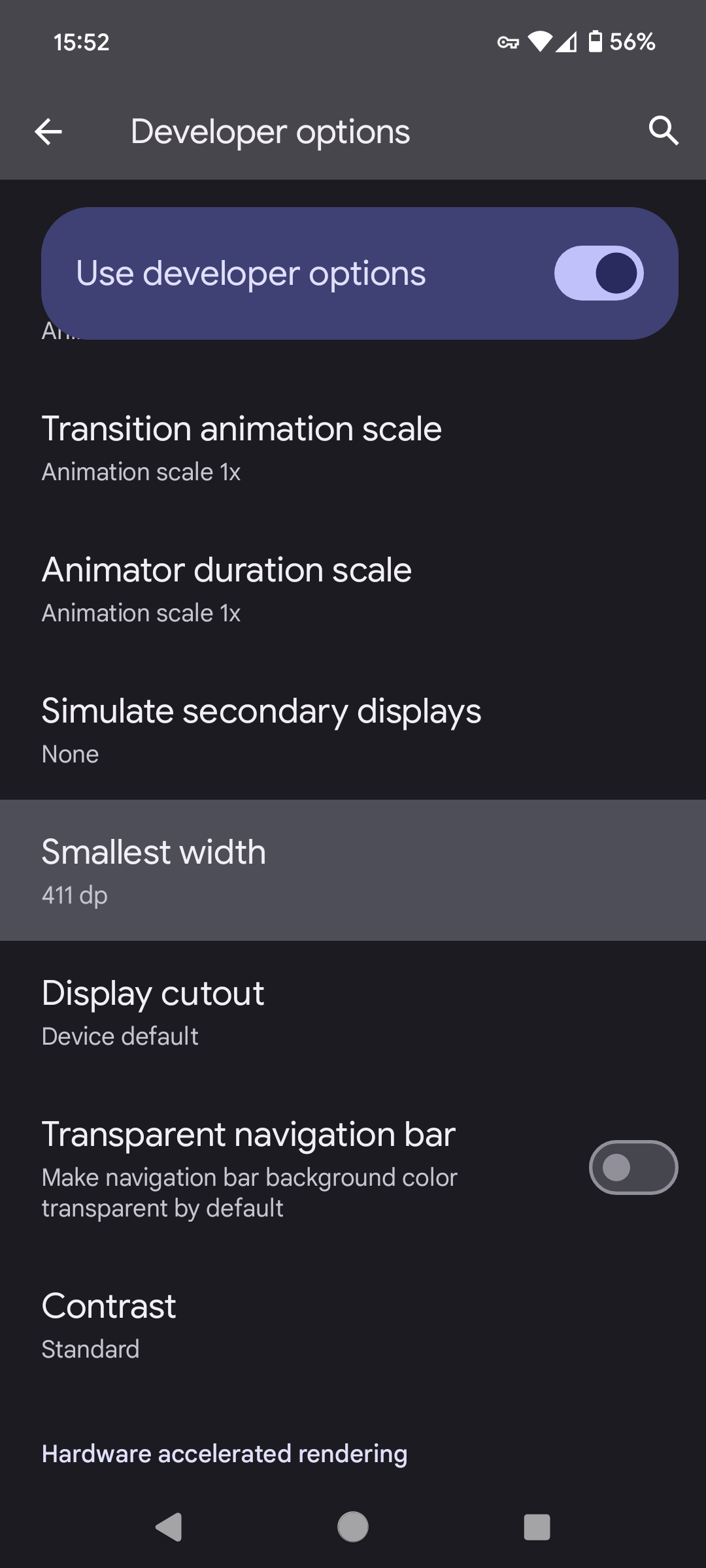
  • What phone do you have? I just upgraded last night and everything appears to be working like normal. But I did notice that you appear to have a smaller screen size than I do. First I’d try adjusting the display size and see if that helps. You can find that setting (on a pixel) under: Settings -> Display -> Display Size and Text.

    You can also try adjusting the accessibility settings and increase or decrease the font size to see if that helps. Which you can find in the same menu above.

    Lastly, you might try enabling developer settings and adjusting the smallest width:

    Edit: none of these should be final solutions but to help troubleshoot what’s wrong. You can then use what you find with these three options to raise a ticket and hopefully the developers can then narrow down the actual root cause.


  • Yes it would. In my case though I know all of the users that should have remote access snd I’m more concerned about unauthorized access than ease of use.

    If I wanted to host a website for the general public to use though, I’d buy a VPS and host it there. Then use SSH with private key authentication for remote management. This way, again, if someone hacks that server they can’t get access to my home lan.


  • Their setup sounds similar to mine. But no, only a single service is exposed to the internet: wireguard.

    The idea is that you can have any number of servers running on your lan, etc… but in order to access them remotely you first need to VPN into your home network. This way the only thing you need to worry about security wise is wireguard. If there’s a security hole / vulnerability in one of the services you’re running on your network or in nginx, etc… attackers would still need to get past wireguard first before they could access your network.

    But here is exactly what I’ve done:

    1. Bought a domain so that I don’t have to remember my IP address.
    2. Setup DDNS so that the A record for my domain always points to my home ip.
    3. Run a wireguard server on my lan.
    4. Port forwarded the wireguard port to the wireguard server.
    5. Created client configs for all remote devices that should have access to my lan.

    Now I can just turn on my phone’s VPN whenever I need to access any one of the services that would normally only be accessible from home.

    P.s. there’s additional steps I did to ensure that the masquerade of the VPN was disabled, that all VPN clients use my pihole, and that I can still get decent internet speeds while on the VPN. But that’s slightly beyond the original ask here.


  • Correct. As I can only provide links to posts that are on your selected home instance. Eventually I’ll change this but you’ll get a 404 page for links that aren’t on your home instance, but see my P.S. below.

    P.s. there have been changes to the Lemmy API that have prevented me from getting updates for about a month now. So most of the results you’re seeing are from old posts only. Until I can rebuild the crawler or find a new API there won’t be any new content.


  • Yep that’s the new idea. The sad part is that with this method there’s no way to get historical data. Only new posts. So if a server goes down, gets DDOSd etc… I’ll lose posts forever.

    Also building an ActivityPub implementation from scratch isn’t trivial either. So that’ll take some time.

    I’ve got a few other ideas I’m playing with as well. Like just assuming that internal post IDs are all sequential and literally fetching them one by one. Or maybe some combination of both?